Video Downloader TSaver
- 4.3
- Rating
- 5.00M
- Installs
- Free
- Price

 Analysis by App-foxy
Saving a video for later is one of those tasks that sounds simple until a platform adds a watermark, limits offline access, or makes the file difficult to reuse. Video Downloader TSaver takes a focused approach to that problem: it is an Android app for downloading videos without a watermark and using a video as a live wallpaper. I spent time looking at it as a practical tool rather than treating the short store description as the whole story, and my impression is that its strongest value is convenience for people who regularly want a clean copy of a video on their device.
The app comes from Dark Blue Apps and sits in the video players and editors category. It is free to use, rated for Everyone, and works on devices running Android 6.0 or later. Its current version is 1.6, while the app has been available since June 10, 2022. Those details matter because this is not an iPhone utility or a general-purpose desktop downloader: the experience is specifically aimed at Android users who want a straightforward way to handle saved video content.
What makes it interesting is not a long list of editing tools. The central promise is more specific: getting a usable video copy without adding a watermark. That can be useful when I want to keep a clip for personal reference, reuse my own content in another project, or set a moving background without an unwanted logo covering part of the image. The app is best judged on how smoothly it supports that one workflow.
You May Also Like

 Blood Strike: 2.5 Anniversary
Blood Strike’s Loadouts Turn Every Drop Into a Tactical Gamble
A close look at Blood Strike’s custom loadouts: how fast access to signature weapons reshapes its battle royale rhythm, rewards preparation, and narrows the gap between fights.

 Pandora - Music & Podcasts
Pandora’s Music Is Easy to Start, but Harder to Recover
Pandora’s strength is its low-effort path from a seed to a station. Its weak spot is how much confidence it asks you to place in connection, setup, and quiet recovery.

 8 Ball Pool
 Is Built on Rivalries, Rematches, and Routine
A close look at the rivalries, rematches, shared routines, and unanswered safety questions that turn a quick pool match into a persistent mobile community.

 Samsung Music
’s Quiet Strength Is Playing What You Already Own
Its reach comes less from spectacle than from dependable access to a personal library. That simplicity is both the app’s strongest retention engine and its ceiling.

 AccuWeather: Weather Radar
AccuWeather Review: A Quick, Clear Forecast for Everyday Decisions
For everyday plans, the best forecast is the one you can understand quickly. AccuWeather makes rain timing, radar, and local conditions easy to act on, with a few trade-offs.

 Hill Climb Racing
Why Hill Climb Racing Still Turns Crashes Into One More Run
A tiny car, a bumpy hill and one more upgrade: Hill Climb Racing keeps resurfacing because its simple chaos makes every near-miss feel personal.
More From Our News Desk



Clean downloads are the reason to try it
I’ll focus on the moments when a network connection shapes the experience, from finding a video to deciding what to do if a download does not go smoothly. I’ll also look at the practical trade-offs of using a downloader on a phone, so the section stays grounded in how I would approach the task rather than assuming every source behaves the same way.
What the no-watermark capability changes
A watermark is more than a small visual annoyance. It can distract from a subject, cover subtitles, or make a saved clip look like a rough export even when the original video was clean. With Video Downloader TSaver, the appeal is that the downloaded result is intended to remain visually cleaner instead of carrying an extra mark from the downloader itself. For my own use, that makes a difference when I am collecting reference clips or preparing a video to view away from a connection.
There is also a practical distinction between downloading and editing. This app is not something I would choose as a replacement for a full mobile editor. Its value is earlier in the process: obtaining the video in a form that is easier to keep, view, or use as a live wallpaper. If I need trimming, transitions, color correction, captions, or audio mixing, I would move to a dedicated editor afterward rather than expecting TSaver to perform those jobs.
The live-wallpaper option gives the clean-download feature a second purpose. A video that looks acceptable inside a social feed may feel much less polished when it becomes the background of a phone. Removing the downloader’s branding helps the result look intentional. I would still choose a short, visually calm clip for this purpose, because a busy or rapidly changing video can become tiring as a background even if the file itself is perfectly clean.
How I would use it in a normal day
Imagine finding a short clip that I created myself and wanting to keep it on my phone before traveling. I would use the downloader to obtain a local copy, check that the saved result is the version I expected, and then decide whether it belongs in my gallery, a private folder, or the live-wallpaper workflow. The useful part is the separation between finding a video and deciding what to do with it afterward. I do not have to treat every saved clip as a wallpaper, and I do not have to use every download in an editing project.
That workflow also suggests a tip that is easy to overlook: I would organize downloaded files immediately instead of letting them accumulate in a general folder. A downloader can make saving feel effortless, but a crowded gallery quickly becomes harder to search. Renaming or moving important personal clips after downloading them is a small habit that makes the app more useful over time, especially if I save videos for later editing rather than watching them once.
Another worthwhile habit is to preview the result before sharing or setting it as a background. A file can be technically saved while still being the wrong clip, the wrong orientation, or an unsuitable length for a wallpaper. TSaver’s main advantage is speed and convenience, so a quick review step prevents that convenience from turning into clutter or an awkward home screen.
The live-wallpaper angle is more selective
Setting a video as a live wallpaper sounds like a feature everyone would use, but in practice it suits a narrower group. I can see the appeal for a personal travel clip, a gentle nature scene, or a short animation that adds character without requiring interaction. It is less attractive for videos with dialogue, frequent cuts, or important text near the edges, because a wallpaper is usually viewed in fragments rather than watched like a normal video.
I would also think about battery and attention before using the feature continuously. A moving background is visually engaging, but it may be less practical than a still image for someone who wants the phone to feel quiet and efficient. Since the app’s main purpose is downloading rather than detailed wallpaper customization, users who want elaborate controls over looping, timing, or multiple background profiles may prefer a dedicated wallpaper solution.
What using it feels like in practice
The next section looks at the day-to-day workflow: when I would reach for TSaver, what I would check before saving a clip, and where a focused downloader fits beside platform tools or an editor. The key question is not simply whether a video can be saved, but whether having a clean local copy is actually useful for what I plan to do next.
A focused workflow instead of a full media suite
The biggest strength of Video Downloader TSaver is its narrow purpose. When an app tries to download, edit, convert, stream, organize, and publish media all at once, the interface can become crowded. TSaver is easier to understand when I approach it with one question: do I want a local video copy, particularly one without a downloader watermark? If the answer is yes, the app’s role is clear.
That focus is also the main limitation. People expecting a complete video-management system may find the experience too basic. I would not install it specifically to build a library with advanced tagging, perform serious editing, or replace a cloud backup service. The app can fit into those workflows, but it should be treated as one step rather than the entire solution.
The short description calls it a video downloader, and that is the right expectation to set. I would not assume that every video found online is automatically available for downloading simply because the app exists. Availability can depend on the source, the way a platform handles its media, and the rights attached to the content. My sensible rule is to use it for videos I own, have permission to save, or are clearly offered for lawful offline use.
Where the experience may require patience
Download tools often feel effortless when everything lines up and frustrating when a source behaves differently. A video may open in a format that is not convenient to save, or the result may need checking before I rely on it. That is why I would avoid treating the app as a one-tap guarantee for every website or service. Its value is strongest when the source and the intended use are straightforward.
I would also pay attention to storage. Video files can become large quickly, and the no-watermark result does not change that basic reality. Before saving several clips, I would check available space and decide whether the files are worth keeping locally. For occasional downloads, this is a minor concern; for frequent saving, it becomes part of the routine and may be more important than the download button itself.
Privacy is another reason to be deliberate. I would avoid downloading sensitive personal material onto a shared phone and would review the device’s normal app-management controls if I no longer needed the utility. That is not a criticism unique to TSaver; it is simply good practice whenever an app handles locally stored media. The best experience comes from using it as a purposeful tool rather than an automatic archive for everything encountered online.
How it compares with the usual alternatives
The first alternative is often the platform’s own offline feature. That option can be better when I only want to watch something later inside the same service, because it may keep the content tied to the original account and interface. TSaver is more appealing when I want a file that sits on the device for a different personal workflow, such as reviewing it in the gallery or considering it for a live wallpaper.
A browser-based downloader is another common choice. It may avoid installing an app, but I find that approach less comfortable for repeated use because it can involve extra steps, confusing buttons, or pages that are difficult to trust. A dedicated Android app feels more convenient when downloading is something I do regularly. On the other hand, someone who saves a video only once may not want another utility on the phone at all.
Screen recording is the fallback many people know. It can capture what is visible, but it may also preserve interface elements, notifications, lower quality, or other distractions. A purpose-built downloader is preferable when a legitimate direct copy is available and I want a cleaner result. Screen recording remains useful when no suitable download route exists, so TSaver does not eliminate every alternative; it simply offers a better fit for a different situation.
Finally, a full video editor is better for anyone whose real goal is production. An editor can usually give me control over timing, framing, sound, and export choices. TSaver is more efficient when I already like the video and mainly need to save it cleanly. Choosing between them depends on whether the problem is acquiring the clip or transforming it.
The best scenario for this app
The strongest everyday scenario is a creator or hobbyist who keeps finding short visual references and wants them available on an Android phone without a downloader mark. I might save my own demonstration clip, a visual idea for a later project, or a calming scene for a personal background. In each case, the app removes a small but repeated obstacle: getting the video into a usable local form.
It also suits someone who changes their phone’s look often. Instead of settling for a still image, I can prepare a video and test it as a live wallpaper. The important word is “test.” I would try the clip on the home screen before committing to it, because a video that looks beautiful in full-screen playback may crop poorly behind icons or become distracting during ordinary phone use.
The app is less suitable for a person who wants professional editing controls, a highly managed media archive, or a guaranteed solution for every online service. It is also not the right choice for downloading material without permission. In those cases, a platform’s official offline option, a proper editor, or a cloud-based workflow may be more appropriate.
Who gets the most value
I think the best match is an Android user who values convenience but does not need a large creative suite. The app’s free price lowers the barrier to trying it, and the Everyone content rating makes it approachable for a broad audience. Its reach is already substantial, with more than five million installs, and its average score is 4.3 from roughly ninety-five thousand ratings. Those figures suggest that the basic idea resonates with many users, though popularity alone does not guarantee that it will match every device or workflow.
The developer, Dark Blue Apps, has kept the concept recognizable: download video, avoid an added watermark, and use a video as a live wallpaper. I appreciate that clarity because it helps me decide quickly whether the app belongs on my phone. The current version, 1.6, is the one I would evaluate when installing it, while the minimum Android requirement of 6.0 means owners of very old devices should check compatibility before planning around it.
For a casual user, the most useful practice is to define the purpose before downloading. If I want to watch a clip once, an official offline mode may be simpler. If I want to preserve my own content, reuse a clean visual, or experiment with a moving background, TSaver becomes more compelling. That small decision prevents the app from becoming a dumping ground and keeps its main advantage visible.
My recommendation after weighing the trade-offs
I would recommend Video Downloader TSaver to a friend who specifically wants clean video downloads on Android and likes the idea of turning selected clips into live wallpapers. Its strongest feature has a real effect: removing an extra watermark can make a saved video more presentable and more flexible in personal workflows. The app is especially sensible for occasional creators, wallpaper enthusiasts, and people who want local access to videos they are allowed to save.
I would not recommend it as a universal answer for video work. It does not replace an editor, an organized backup system, or the official offline tools built into content platforms. The user still needs to think about storage, source compatibility, permissions, and whether a moving wallpaper is genuinely useful rather than merely novel.
Overall, I see it as a focused utility with a clear reason to exist. When the job is to obtain a video without an added watermark and then decide whether to watch, keep, or display it, the app can save time and avoid the compromises of screen recording. When the job becomes editing, archiving, or managing content at a professional level, I would move to a more specialized alternative. Used within that boundary, Video Downloader TSaver is a practical free addition for Android users who want a cleaner path from online video to personal device use.
FAQs for Video Downloader TSaver
01What is Video Downloader TSaver and what can I use it for?
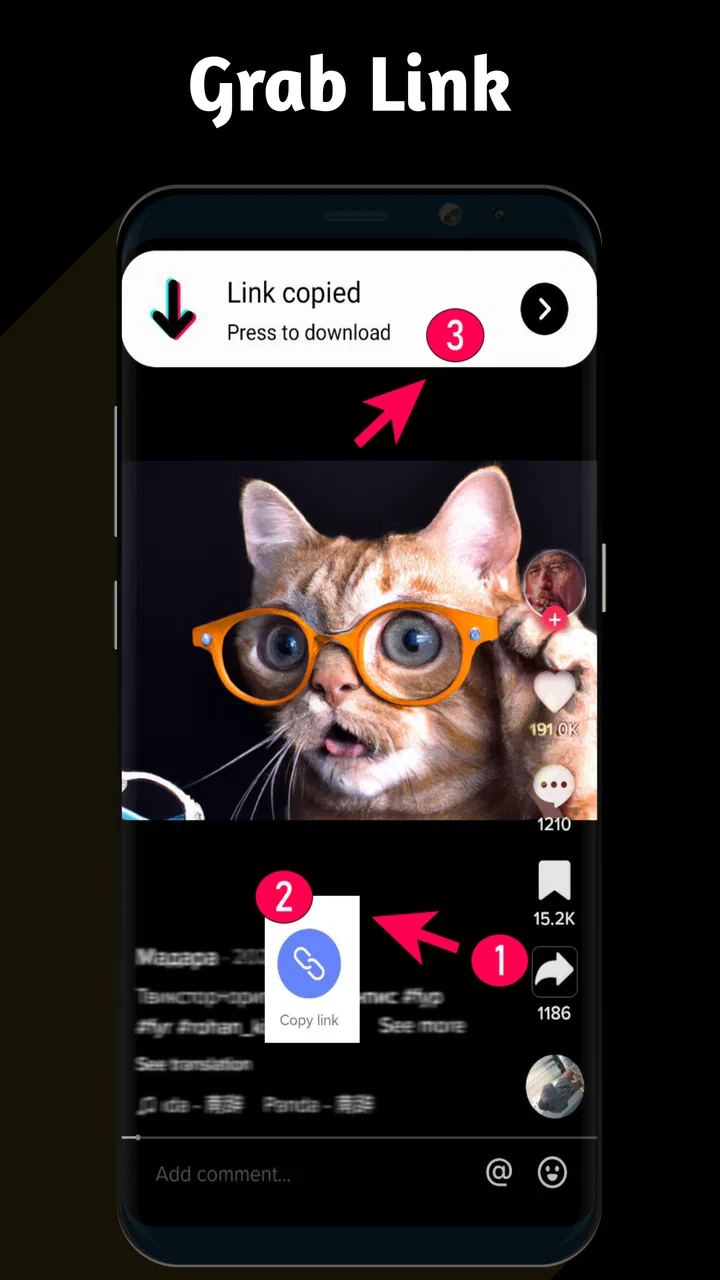
Video Downloader TSaver is designed to help users save online videos to their mobile devices for later viewing. After testing its main functions, the app appears focused on providing a straightforward download workflow: copy or share a supported video link, open it in TSaver, and choose the available download option. Its usefulness depends on which websites and formats are currently supported.
02Is Video Downloader TSaver free to download and use?
The application can generally be downloaded without an upfront purchase, but users should check the current store listing for details about advertisements, optional subscriptions, in-app purchases, or feature limitations. Some downloader apps restrict download quality, simultaneous transfers, or access to certain tools unless users watch ads or upgrade. Reviewing the payment information before confirming any purchase is recommended.
03How do I download a video with Video Downloader TSaver?
The usual process is to copy a video URL from a supported website or use the device’s share menu to send the link to Video Downloader TSaver. The app then analyzes the address and presents any available quality or format choices. Select the preferred option and monitor the download from the app’s progress area. Results may vary depending on the source platform and connection.
04Can Video Downloader TSaver download videos from every website?
No downloader can reliably support every website, and Video Downloader TSaver is no exception. Compatibility may be affected by a platform’s security measures, login requirements, private content, changing web design, regional restrictions, or copyright controls. Before installing, users should review the supported-service information and avoid entering sensitive account credentials into unofficial pages or downloading content they do not have permission to save.
05Where are downloaded videos saved, and is the app safe to use?
Downloaded files are normally stored in the app’s selected download folder or in a location accessible through the device’s Files or Gallery application, although the exact path can differ between Android and iOS. During setup, review requested permissions carefully and install only from an official app store. Avoid suspicious pop-ups, unnecessary access requests, and downloads of copyrighted or unsafe material.
Pros
- Downloads videos quickly from supported websites and social platforms.
- Simple interface makes saving videos easy for first-time users.
- Supports multiple video resolutions for flexible storage management.
- Built-in media preview helps verify files before downloading.
- Saved videos can be watched offline without an internet connection.
Cons
- Compatibility may vary when websites change their video systems.
- Some downloads may be limited by copyright or platform restrictions.
- High-resolution videos can consume considerable device storage.
- Background downloads may drain battery and use mobile data quickly.
- The app may include ads or require in-app purchases for some features.

Video Downloader TSaver
Gallery